Export Contacts (numbers) from WhatsApp Group to Excel
Export Contacts (numbers) from WhatsApp Group to Excel
If you want to extract contacts or phone numbers from WhatsApp, even from some WhatsApp Groups you are subscribed to, there are two software that could help you.
Below we will show you how these software works to Export WhatsApp Group Contacts to Excel in a simply and fast way.
Software #1. WhatBot Plus
WhatBot Plus is one of the best WhatsApp Marketing software able to send newletter and works also as auto reply software. It is available both for Windows and macOS users.
Inside this program there is also a powerful Group Grabber feature that allows you to extract contacts from any WhatsApp Group.
Once you install and open the program you need to click on Open WhatsApp button and login to your account (scanning the QR code). Then click on Group Grabber button as you can see in the image below.
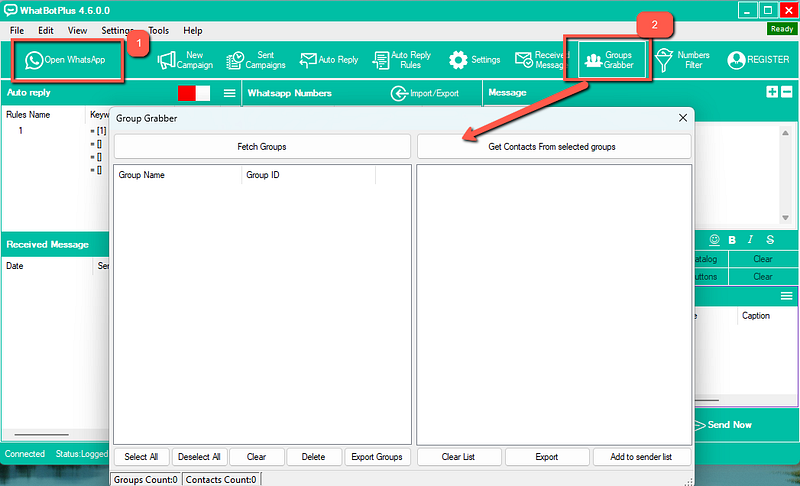
Click on Fetch Groups button and all your groups will appear in the list box below. Now you just need to click on Get Contacts from selected groups to extract phone numbers.
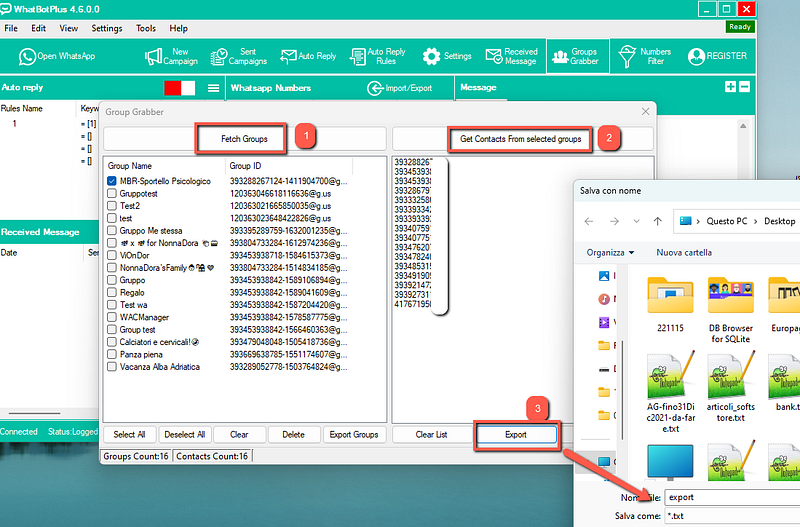
Finally click on Export button and you will be able to save all contacts (phone numbers) in a txt file on your PC.
Software #2. WHATSENDER TOOL
WHATSENDER TOOL is a program designed to send bulk WhatsApp Messages from PC (even to contacts not saved in your Address Book) but it also has a “Contacts Grabber” function that allows you to export phone numbers from WhatsApp Group on your PC (in a csv or excel file).
Its operation is very simple. Here are the detailed steps to follow.
Step 1. Download, install and run WSTOOL on your computer. Here is the main screen of the software:
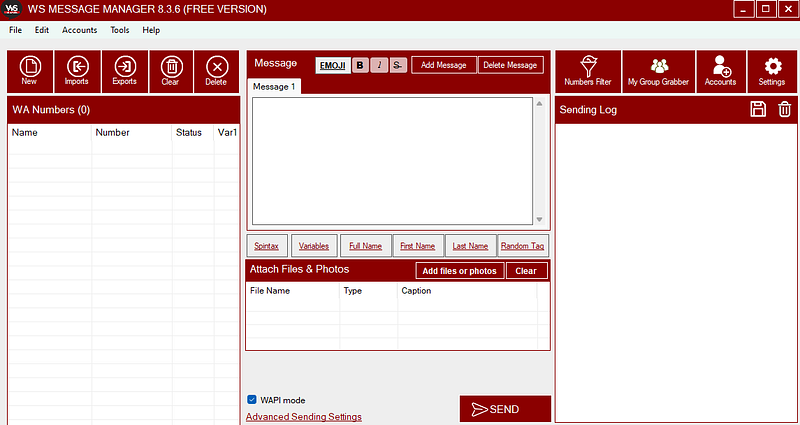
Step 2. Click on the Tools menu → Contacts Grabber at the top
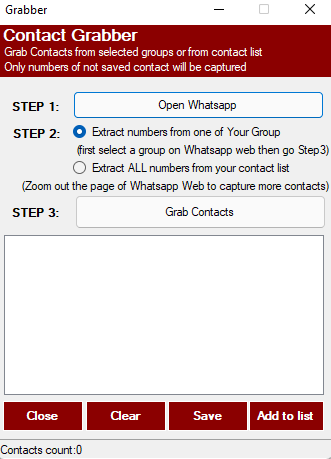
Step 3. Click “Open Whatsapp web” and scan the QR code using your mobile phone (after opening the WhatsApp app and clicking on Settings -> Whatsapp Web)
Step 4. Once Whatsapp Web opens on your browser (Chrome), select from the left the group from which you want to extrapolate the phone numbers. Or stay on the Whatsapp Web home if you want to extract the numbers of contacts (not saved in your address book) but who have sent you a message.
Step 5. From the WSTOOL window click on the “Grab Contacts” button to start the extraction of the numbers which you can then save on your computer in a txt file.
Here is a video tutorial that explains well how it works: